Before Uploading a Dataset
This page covers what needs to be in place before you can upload a dataset and register it in FairdomSEEK (Metadata catalogue). It also covers how sharing permissions work, and how to find data you are already entitled to access.
This page assumes that an assay already exists in FairdomSEEK
If you're setting up a brand new study/assay, or defining the metadata structure for the first time, use the Full Guide instead. This page is for uploading into an assay someone has already created.
Are you ready to upload?
- You have an active FairdomSEEK account.
- You've been added to your Work Package's FairdomSEEK project.
- You have editing access to the FairdomSEEK assay you're uploading to.
- You know the assay ID.
If any of these do not apply to you, the upcoming sections will guide you through how to get there. Otherwise, you're all ready to upload!
1. Get a FairdomSEEK account
- Go to FairdomSEEK & select "Log in" at the top right corner.
- Under the "KeyCloak" tab, click "Sign in with KeyCloak".
- Click "SURFcontext" and sign in with your university account.
- On first login, grant the requested permissions. Please contact data@cropxr.org if you are unable to login.
2. Confirm you've been added to your project
- Whilst logged in, click on your name in the top-right corner.
- Select "My profile".
- Select "Related items".
- Select the "Projects" item to display the projects that you are a member of.
Every CropXR Work Package maps to a single project in FairdomSEEK.
| FairdomSEEK project | Work Package |
|---|---|
| C1 | Work Package 1 |
| C2 | Work Package 2 |
| ... | ... |
Projects are visible to everyone, even if you have never joined one. You can browse projects by clicking the 'Browse' tab in the navigation bar, and selecting 'Projects'.
If you're not yet a member of your Work Package's project, you can request membership from the project's page.
Every project has a Work Package Lead, who acts as the Project Administrator and approves join requests. If you do not know who your Work Package Lead is, please contact the DataXR team (data@cropxr.org).
Access to project studies, assays and data files is not automatically granted to project members. Access to such material must be shared separately (see Permission levels).
3. Be a creator of the assay
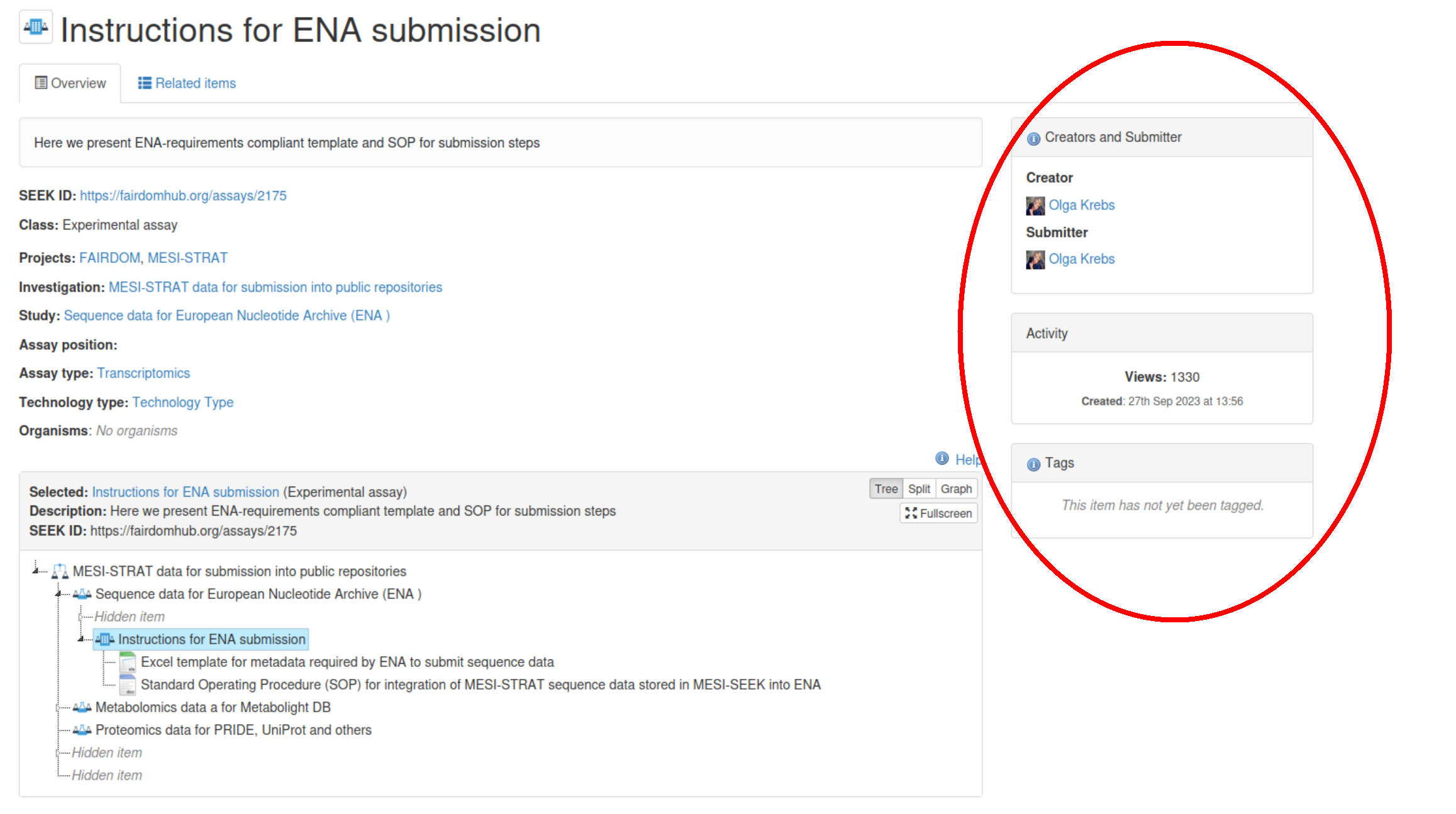
Uploading requires that you are the submitter, a creator or a manager of the assay itself, not just of the study it belongs to, or the investigation the study belongs to. Editing access alone is not enough for an upload.
Access does not cascade
Having access to a study does not automatically give you access to its assays. Similarly, having access to an assay does not give you access to its data files. Each is shared independently, so please check permissions on the specific assay you intend to upload to.
If you are none of these, ask the submitter of the assay, or the Work Package Lead, to add you as a creator of the assay. An assay can have several creators. If you can't find the assay at all, it may be shared privately with people other than yourself (see Finding data you're entitled to access).
The image below of an assay page shows where to find the creator/submitter.
If the assay doesn't exist yet, it needs to be created before you can upload. See the Full Guide for how to:
- Create the assay.
- Connect it to the correct study and investigation.
- Set-up its metadata skeleton (choosing the right templates).
4. Find the assay ID
The assay ID is the number at the end of the assay's URL. Open the assay in FairdomSEEK and read it off the address bar:
The same pattern applies to studies, investigations, and data files. The ID is always the number at the end of that resource's URL.
See also
- Short Guide — quick reference for entering metadata once you're set up
- Full Guide — detailed guide for creating studies and assays from scratch
- Reference — formatting reference for the upload spreadsheets