Upload with the Command Line Tool
You need to first install the tool on your computer. Follow the installation guide.
Copy each command from this page into the terminal and press Enter. Some commands hold example values that you replace with your own. The page says which.
Sign in
If you have never signed in to the catalogue, do that once in your browser first. The Resilience Hub knows you only after that.
The tool prints a link and waits.
Open the link in your browser and sign in. The browser then asks whether you grant the tool access. Click "Yes". The terminal continues by itself.
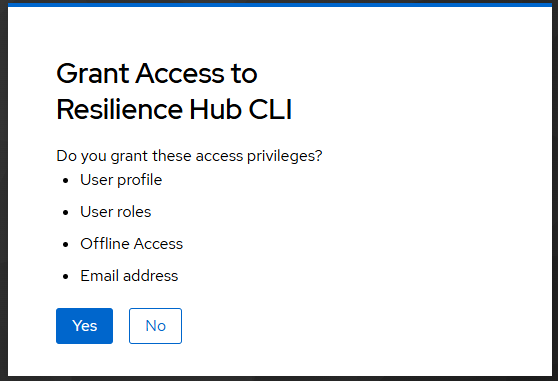
You sign in once. The tool remembers it.
Upload a dataset
Before you can upload
Your metadata has to be in the catalogue first, with the assay that the dataset belongs to. If it is not there yet, see SEEK Metadata Entry.
Find the assay id
Open the assay in the catalogue. The assay id is the number at the end of the address in the address bar of your browser.
In this example the assay id is 42.
Command to upload data
Put everything that belongs to the dataset into one folder. To upload it, run this command in the terminal.
Replace the three example values with your own.
| Example value | Replace it with |
|---|---|
/path/to/data |
The place of your folder on your computer. On macOS you can drag the folder into the terminal. On Windows it looks like C:\Users\anna\data\trial |
42 |
Your assay id |
Dataset Title |
The title of your dataset in the catalogue |
Keep the quotes around the place of the folder and around the title.
Once the upload has started, the tool reads every file once and then sends the files. It shows you the status.
A large dataset takes longer. Keep your laptop charging and make sure that it does not go to sleep.
Data upload successful
"Upload verified." means that all your files arrived unchanged. The work package lead of your project gets an email with the link in the last line and registers the dataset.
An upload cannot be changed afterwards
To correct a dataset, fix the folder on your computer and upload it again.
What one upload can hold
- Files smaller than 5 GiB each, and at most 10000 files.
- What can be sent within one hour. Split a larger dataset into several uploads.
To stop an upload, press Ctrl+C. A stopped upload has to be started again.
Questions and feedback
Write to the DataXR team at data@cropxr.org. Include the output of rhub --version and rhub whoami, the command you ran, and what the tool printed. Never send a password or a token.
Update or remove the tool
To move to a new version, run the command of Install rhub again, with the new version number in place of v0.2.0.
These commands remove the stored sign-in and the tool.